
Certificates as Code: Requesting Let’s Encrypt Certificates via Pull Request
For several years we have used Acmebot to manage Let’s Encrypt certificates in Azure. It runs as a Function App, validates domain ownership with DNS-01 against Azure DNS, stores certificates in Azure Key Vault and renews them automatically. Azure services like App Service, Front Door and Application Gateway pick up the new version from Key Vault on their own. It is one of those tools that just works.
What didn’t work so well was how we requested certificates. Someone opened the Acmebot dashboard, typed DNS names, picked a DNS provider and clicked “Issue”. No review, no history of who asked for what and why, and no easy way to answer “which certificates do we actually own, and are they all supposed to be there?”.
With Acmebot v5 we got a CLI. That was the missing piece to treat certificates the same way we treat the rest of our infrastructure — as code.
The Core Idea
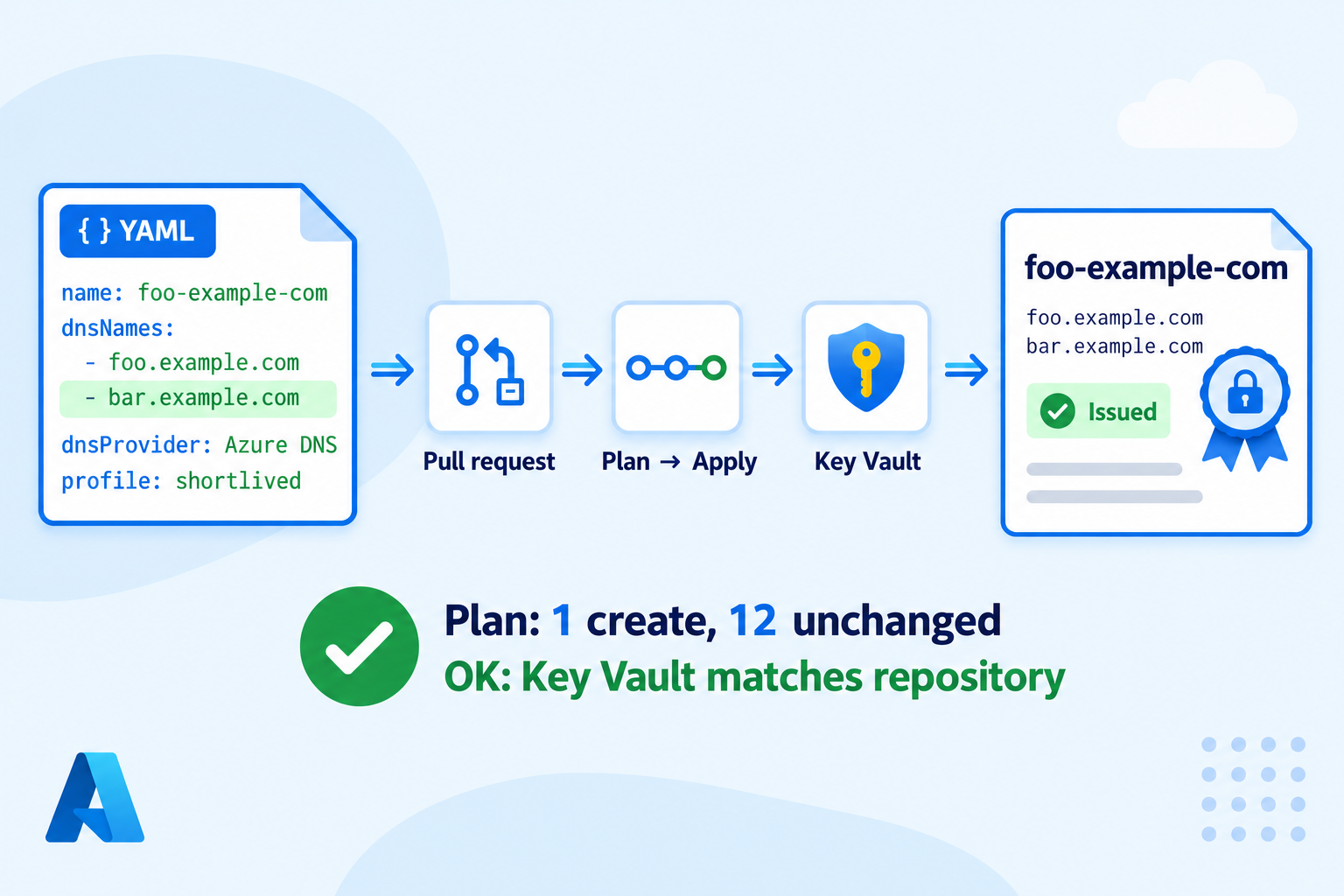
Every certificate is a small YAML file in a Git repository. You request a new certificate by opening a pull request. The pipeline validates the file and shows what would change. When the PR is merged, the pipeline makes Key Vault match the repository.
# certificates/wildcard-example-com.yaml
name: wildcard-example-com
dnsNames: ["*.example.com", "example.com"]
dnsProvider: Azure DNS
keyType: RSA
keySize: 2048
tags:
  owner: team-x
That’s it. The file name equals the Key Vault certificate name, so there is exactly one place to look for a certificate’s definition.
What the repository does not do is renewal. Acmebot already renews certificates 30 days before expiry, and I didn’t want to duplicate that. The repository describes which certificates should exist; Acmebot keeps them alive.
Acmebot CLI in 30 Seconds
The CLI is a .NET tool (Acmebot.Cli on NuGet) that wraps Acmebot’s authenticated REST API:
dotnet tool install --global Acmebot.Cli

export ACMEBOT_ENDPOINT=https://my-acmebot.azurewebsites.net
export ACMEBOT_AUDIENCE=api://<acmebot-app-client-id>

acmebot certificate list
acmebot dns-zone list
acmebot certificate issue --name wildcard-example-com \
  --dns-name "*.example.com" --dns-name example.com \
  --dns-provider "Azure DNS"
It authenticates with DefaultAzureCredential, so locally it uses your az login session and in a pipeline it uses whatever identity the AzureCLI@2 task signed in with. Every command supports --json, which makes it easy to script against.
There is no declarative “apply this folder” mode in the CLI, so that is the part I had to build.
Diff-Based or Reconcile?
The first design decision was how the pipeline decides what to issue. Two options:
- Git diff — issue only certificates whose files changed in the merge commit.
- Reconcile — on every run, compare all files with what Acmebot already manages and issue whatever is missing or different.
Git diff sounds simpler, but it has an annoying failure mode: if an issuance fails, the next run doesn’t see a change and never retries. Reconcile is idempotent — rerunning the pipeline is always safe, and it self-heals after a failure.
My first worry about reconcile was speed: what if we have hundreds of certificates? It turns out not to matter. acmebot certificate list is a single API call that returns everything. The comparison happens locally in milliseconds. Only actual differences trigger an issuance.
A nice side effect: reconcile naturally adopts certificates that were issued from the portal before. Export them to YAML once, and the plan shows them as unchanged — no reissue, no Let’s Encrypt rate limits.
The Repository
certificates/<name>.yaml          # one file per certificate
schema/certificate.schema.json    # JSON Schema for the YAML
acmecerts/                        # small Python package
  model.py                        # load + validate YAML
  acmebot.py                      # thin wrapper over `acmebot --json ...`
  reconcile.py                    # diff desired vs actual, apply
  __main__.py                     # validate | plan | apply | export
tests/                            # pytest, Acmebot CLI mocked
azure-pipelines.yml
The Python package has four commands:
| Command | Needs Azure | What it does |
|---|---|---|
validate |
no | JSON Schema, file name equals name, unique names, key options consistent with key type, reserved tags |
plan |
read-only | Checks every DNS name has a matching zone in Acmebot, then prints create / update / orphan |
apply |
yes | Issues everything in create and update, waits for all operations in parallel |
export |
read-only | Writes YAML files for certificates that already exist — used once to bootstrap |
A plan looks like this:
  create  foo-example-com  foo.example.com, bar.example.com
  orphan  old-example-com  (in Key Vault, not in repo; revoke manually if unused)
Summary: 1 create, 0 update, 12 unchanged, 1 orphan
Updates and deletions
If you change dnsNames or the key parameters, the certificate is reissued under the same name. Key Vault simply gets a new version, and consumers pick it up as usual.
Deleting a file does nothing except show the certificate as an orphan in the plan. Auto-revoking on file deletion sounded elegant, but one accidental delete would take down a production certificate. Revocation stays a deliberate, manual action.
A safety net
apply refuses to start more than 20 issuances in one run (configurable). If a bug in the comparison ever decided that every certificate had changed, we would hit Let’s Encrypt rate limits and reissue our whole fleet. The guard turns that into a failed pipeline instead.
Issuing in parallel
Issuance is asynchronous: Acmebot returns 202 Accepted and an operation ID, then runs the DNS-01 challenge in a Durable Functions orchestration. A single issuance takes a minute or two, mostly waiting for DNS propagation. apply starts all issuances with --no-wait first, then waits for them in a thread pool:
for cert in plan.to_issue:
    started[cert.name] = client.issue(cert)        # acmebot certificate issue --no-wait

with ThreadPoolExecutor(max_workers=parallel) as pool:
    for name, error in pool.map(wait, started.items()):   # acmebot operation wait <id>
        results[name] = error
The Pipeline
One YAML pipeline with three stages:
- Validate — unit tests and
validate. No Azure access needed. - Plan — installs the Acmebot CLI and runs
planwith the service connection. The plan output is visible in the PR build. - Apply — only on
main, as a deployment job targeting an Azure DevOps environment (so you can add approvals and an exclusive lock), runsapply.
- stage: Apply
  dependsOn: Plan
  condition: and(succeeded(), eq(variables['Build.SourceBranch'], 'refs/heads/main'), ne(variables['Build.Reason'], 'PullRequest'))
  jobs:
    - deployment: Apply
      environment: acmebot-prod
      strategy:
        runOnce:
          deploy:
            steps:
              - checkout: self
              - template: pipelines/setup-steps.yml
              - task: AzureCLI@2
                inputs:
                  azureSubscription: $(serviceConnection)
                  scriptType: bash
                  scriptLocation: inlineScript
                  inlineScript: python -m acmecerts apply --max-issue $(maxIssue)
Note that with Azure Repos the pr: trigger keyword is ignored. PR builds come from a branch policy on main with build validation pointing to this pipeline. Combined with required reviewers, that gives us the review step we were missing.
Authentication: Where I Spent Most of the Time
The code was the easy part. Getting a pipeline identity and a developer laptop to talk to the Acmebot API took longer. Here is what was needed.
Pipeline identity. A user-assigned managed identity behind an Azure Resource Manager service connection with workload identity federation. No secrets. It needs no Azure RBAC to call Acmebot, but AzureCLI@2 runs az account set after login, which fails if the identity can’t see any subscription. Reader on a single resource group is enough for that. Service connection verification wants subscriptions/read at subscription scope — use “Save without verification” if you want to stay least-privilege.
Audience. ACMEBOT_AUDIENCE must be the Application ID URI of the Acmebot app registration that App Service Authentication uses — not the client ID of your managed identity. Yes, I mixed them up. Entra ID replies with AADSTS500011: The resource principal named api://... was not found.
Local az login. For the Azure CLI to request a token for the Acmebot API on your behalf, add the Azure CLI client (04b07795-8ddb-461a-bbee-02f9e1bf7b46) as an authorized client application under Expose an API. Otherwise you get AADSTS65001: The user or administrator has not consented.
Easy Auth client restriction. Then came a 403 Forbidden. When you enable Authentication in the portal, the default is “Allow requests only from this application itself”. Tokens issued to the Azure CLI or to a managed identity are rejected. Add their client IDs to the allowed client applications.
App roles. By default, any authenticated identity can issue and revoke (see Acmebot’s security notes). Set Acmebot__RequireAppRoles=true and assign Acmebot.IssueCertificate to the pipeline identity. Managed identities can’t be assigned app roles in the portal, so this is a Graph call:
az rest --method POST \
  --uri "https://graph.microsoft.com/v1.0/servicePrincipals/$UAMI_SP/appRoleAssignments" \
  --body "{\"principalId\":\"$UAMI_SP\",\"resourceId\":\"$ACMEBOT_SP\",\"appRoleId\":\"$ROLE_ID\"}"
Lessons Learned
Resource locks break DNS-01. The first real issuance failed with a generic 500. Application Insights showed the actual problem: Acmebot created the _acme-challenge TXT record, but couldn’t delete it afterwards:
cannot perform delete operation because following scope(s) are locked:
'.../dnszones/example.com' ... ErrorCode: ScopeLocked
If you bought your domain via App Service Domains, Azure puts a CanNotDelete lock on the DNS zone. That lock also blocks deleting records inside the zone. It turned out this was also why one of our existing wildcard certificates had silently expired — Acmebot’s renewals had been failing for weeks. Removing the zone lock (keeping the lock on the domain registration itself) fixed both.
Check the .NET version. Acmebot CLI 5.1.5 targets .NET 10. On macOS with Homebrew you also need DOTNET_ROOT=/opt/homebrew/opt/dotnet/libexec, otherwise the tool can’t find the runtime.
You can’t choose the validity period. Let’s Encrypt decides certificate lifetime through ACME profiles (classic, tlsserver, shortlived), not a “valid for N days” field. The YAML exposes profile, which Acmebot passes through.
Summary
Acmebot handles the hard part of certificate management — ACME, DNS-01, Key Vault, renewal. What it didn’t give us out of the box was review, history and a clear inventory. A Git repository with one YAML file per certificate, a small reconcile script around the Acmebot CLI, and a three-stage Azure DevOps pipeline closed that gap:
- certificate requests are pull requests, reviewed like any other change;
- the PR build shows exactly what will be issued;
- merging to
mainmakes Key Vault match the repository; - rerunning the pipeline is always safe;
- certificates nobody claims show up as orphans instead of hiding in Key Vault.
If you already run Acmebot, the whole setup is a few hundred lines of code and an afternoon of fighting with Entra ID.
Useful Links
Acmebot
- Acmebot documentation and getting started guide
- CLI reference
- REST API reference
- Configuration reference
- DNS providers
- Security
- Source code on GitHub
- Acmebot.Cli on NuGet
Let’s Encrypt
Azure and Azure DevOps